
SoLive - Live Video Chat
LOKA DİGİTAL MEDYA REKLAMCILIK VE TEKNOLOJİ A.ŞSocial
4.31.51K Reviews
- Version
- 1.6.151
- Installs
- 10.00M
- Age Rating
- Mature 17+
Screenshots




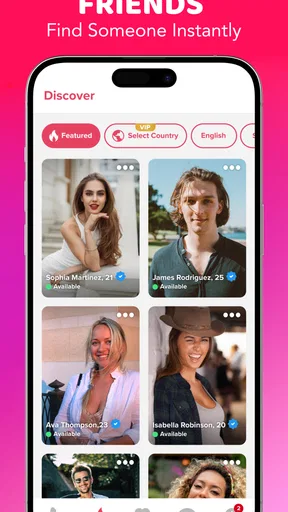

Our Review of SoLive - Live Video Chat
 Analysis by Appyee
I approached SoLive - Live Video Chat as something a person might use casually at home, perhaps while another family member is nearby or when a shared tablet makes private app use less private than expected. It is a social app built around live video conversations with other people, and that focus makes it feel more immediate than ordinary messaging. You are not simply leaving a note for someone to answer later; you are entering a space where appearance, voice, timing, and personal boundaries all matter at once.
My overall impression is mixed in a useful way. The app can be appealing if you enjoy spontaneous video interaction and are comfortable deciding quickly who deserves your attention. It is less suitable if you want a tightly controlled family communication tool, a quiet messaging service, or an experience where every interaction is predictable. The free entry point makes it easy to try, but the mature audience and the possibility of optional spending mean that I would treat it as an individual-use app rather than something to hand casually to a child.
How SoLive fits into everyday shared-device use
The most realistic household scenario is simple: one person installs the app on a phone or tablet that other people sometimes borrow. That arrangement changes the way I would use it. A live video service is more personal than a weather app or a puzzle game, because an open session can expose a conversation, a face, or a notification at exactly the wrong moment. Even without assuming anything about the app’s controls, the shared-device question is important before the first call.
For example, I can imagine using it after work when I want a quick social conversation rather than a long text exchange. If someone else needs the same device, I would finish the interaction, close the app, and check what remains visible before handing it over. That is not a criticism unique to SoLive; it is a practical habit for any live communication service. The difference is that video creates more personal context, so an unlocked screen can reveal more than a message preview.
It also matters whether the device belongs to one person or the whole household. On a personal phone, I can keep my account decisions separate from everyone else’s. On a family tablet, switching between users can become awkward if the app opens directly into the last-used session or if another person assumes the visible account is theirs. I would not rely on the device being shared as a substitute for separate accounts. Each regular user should have a clearly separate arrangement, and casual guests should not be encouraged to explore a live social profile without supervision.
That makes the app a better fit for an adult who wants direct, spontaneous contact than for a family looking for one common social space. The store places it in the social category, and that is exactly how it feels: personal interaction is the point, not household coordination, homework, event planning, or private group administration.
What the first setup tells me about boundaries
The initial setup deserves more thought than simply installing and tapping through screens. I would choose the account identity carefully, decide whether the device is genuinely private, and make sure the owner understands that a live video app may lead to conversations with people they do not know offline. Those decisions are more important than making the profile look attractive. A polished profile can invite attention, but it does not automatically make that attention trustworthy.
I would also establish a basic rule for shared use: nobody else should start a conversation from another person’s account, and nobody should spend money without the account holder’s clear approval. SoLive is free to install, but it includes optional purchases ranging from small amounts to substantially higher individual prices. That range is enough reason to keep purchasing decisions personal and deliberate, especially when the app is installed on a device connected to a shared payment method.
On a household tablet, I would avoid leaving the app open in a common room if conversations can begin unexpectedly. On a personal phone, I would still think about when incoming activity can interrupt work, sleep, or family time. Live services are demanding in a way that asynchronous chat is not: the appeal comes from immediacy, but immediacy can also become pressure.
One useful workflow is to separate discovery from commitment. I would first learn how the app feels with short conversations, then decide whether it deserves regular use. I would not buy anything merely because a conversation is entertaining or because the app makes continued interaction feel urgent. The free version is enough to judge whether the style of social contact suits me; purchases should only enter the picture after I understand my own usage.
Coordinating conversations without losing control
SoLive works best when I treat every live interaction as something I choose, not something I owe. If I am busy, tired, or in a noisy household, a video conversation may be the wrong format even if the other person is available. A short, polite exit is better than staying connected while distracted. This is one area where the app differs from ordinary text messaging: video tends to demand attention from both sides.
For household coordination, I would use another familiar method. A family calendar, a normal messaging app, or a phone call is more practical for arranging pickups, sharing grocery reminders, or confirming appointments. SoLive’s strength is the social encounter itself, not the reliable management of shared responsibilities. Trying to turn it into a household noticeboard would add friction without improving the experience.
There is also a useful distinction between planned and spontaneous use. If I already know whom I want to contact, the live format can feel warm and direct. If I am browsing for an interaction without a clear purpose, I need stronger personal limits because the session can consume more time than expected. I would set a stopping point before opening the app, particularly on a device shared with others. That small decision prevents a casual check from becoming an unplanned evening activity.
Another practical habit is to keep personal surroundings out of view when possible. A camera does not only show the person using the app; it can also show a room, family photographs, school items, work documents, or other people who did not agree to appear. I would choose a neutral location and check the frame before joining a conversation. This is a concrete advantage of treating video as a deliberate activity rather than as an extension of text chat.
Compared with a conventional social network, the app feels more immediate and less suited to carefully edited self-presentation. Compared with a messaging app, it offers more human presence but less convenience when I cannot talk freely. Compared with a random video-chat service, the same basic caution applies: the social reward can be quick, while judging another person’s intentions takes longer. That trade-off is central to deciding whether the app belongs on a personal device.
Age context and the question of trust
The mature age classification is not a minor label I would ignore. It changes my recommendation completely for households with teenagers or younger children. I would not treat the app as a general family entertainment download, and I would not assume that a young user can manage every live interaction safely simply because they are comfortable with smartphones. The adult responsible for the device should make the decision, discuss boundaries, and consider whether the user is ready for direct contact with unfamiliar people.
SoLive is a product of LOKA DİGİTAL MEDYA REKLAMCILIK VE TEKNOLOJİ A.Ş, and its scale suggests that it has reached a substantial audience: the app has passed ten million installs and holds an average rating of 4.3 from roughly seventy-nine thousand ratings. Those figures help explain why someone may encounter an active social environment, but they do not turn every conversation into a safe one. Popularity can bring variety; it cannot replace judgment.
Trust should therefore develop slowly. I would avoid sharing a full name, home details, workplace information, school information, travel plans, or anything that makes it easy to locate me. I would also be cautious about moving a conversation elsewhere simply because someone asks. The more quickly a stranger pushes for private details, money, or a different contact channel, the more comfortable I would be ending the interaction.
For shared devices, the age issue has a second layer. A mature-rated app should not be left available for younger household members to open accidentally, and I would not assume that a child understands the difference between a friendly conversation and manipulative attention. Since the editorial question here is household use, my advice is straightforward: keep the app tied to an adult’s clearly personal account and device whenever possible. If that arrangement is impossible, I would choose a different communication option for the household.
The same caution applies to spending. In-app purchases can cost between ninety-nine cents and two hundred ninety-nine dollars and ninety-nine cents per item. I would never let a child or casual guest make purchases from a shared payment setup, and I would review the device’s purchase protections before installing the app. The important point is not that buying is required; it is that the available price range makes accidental or impulsive spending a real household consideration.
Performance expectations and everyday friction
Video chat is only as comfortable as the surrounding conditions. A weak connection, a loud room, poor lighting, or a nearly empty battery can make a promising conversation unpleasant. I would use it where I can hear clearly and where the camera does not expose private parts of the home. These are ordinary video-chat concerns, but they affect SoLive more than a text-based social app because the service depends on being present in real time.
The current version is 1.6.151, and the app supports devices running Android 8.0 or later. That gives it a reasonably broad Android reach, although owners of older phones should still consider how smoothly their particular hardware handles camera use and multitasking. I would update before judging the experience, then test it on the device and connection I actually plan to use rather than assuming that a newer phone elsewhere will behave the same way.
One friction point is the need to make quick social decisions. In a written network, I can read a profile, wait, and compose a response. In live video, I may have only a moment to decide whether I want to continue. That immediacy is the app’s appeal, but it is also why I would not recommend it to someone who dislikes spontaneous interaction or feels uncomfortable ending conversations directly.
Another limitation is privacy in ordinary surroundings. A private room is not always available, and headphones solve only part of the problem. They can reduce what others hear, but they do not prevent someone nearby from appearing in the camera frame or overhearing the user’s side of the conversation. For a shared household, a designated personal space is a practical improvement, not an optional luxury.
Who will enjoy it, and who should choose something else
I think SoLive is strongest for adults who genuinely want live social contact and are willing to manage their own boundaries. Someone who finds text chat too distant may appreciate the immediacy of seeing and hearing another person. It can also suit a user who wants to meet people casually rather than maintain a carefully organized list of existing contacts. The free price makes experimentation accessible, while the mature classification gives a clear signal that this is not aimed at children.
I would skip it if my main goal were dependable communication with relatives, private coordination with housemates, or a calm place to exchange messages. A standard messenger is better for sending details that need to remain easy to find later. A conventional video-calling tool is usually the clearer choice when I already know the people I want to reach. A moderated community platform may be preferable when I want shared interests, visible rules, and less emphasis on one-to-one spontaneity.
I would also skip it if I tend to make quick purchases under social pressure, if I cannot use a personal device, or if I am uncomfortable with the possibility of unexpected conversations. Those are not signs that the app is defective; they are signs that its central format does not match my needs. The best social app is the one whose pace and boundaries I can manage without feeling pushed.
My household verdict after weighing the trade-offs
SoLive - Live Video Chat is an easy-to-understand social app with a clear purpose: it puts live video interaction at the center. I can see why it has attracted a large audience, and the strong average rating gives it a credible starting point for anyone curious about this style of communication. Still, I would judge it by personal fit rather than popularity. Live contact can feel more genuine than text, but it also asks for more attention and exposes more of everyday life.
My recommendation is positive for an adult using a personal device, a personal account, and sensible spending limits. I would prepare the setting, keep conversations intentional, and leave quickly when an interaction feels uncomfortable. I would not recommend it as a shared family app, a children’s social space, or a replacement for practical household messaging.
The final decision comes down to control. If I can control when I appear on camera, what I reveal, how long I stay, and whether I spend money, the app can be an enjoyable way to add real-time presence to social discovery. If those boundaries are difficult to maintain in the household, a slower and more familiar communication tool is the wiser choice. For me, the most important rule is to keep live social interaction personal, deliberate, and separate from shared-device routines.
Verdict
Strengths of SoLive - Live Video Chat
- Meet people worldwide through live video conversations.
- Quick matching makes it easy to start chatting with new users.
- Live interaction feels more personal than text-based social apps.
- Useful filters help narrow down potential chat partners.
- Simple interface is easy for first-time users to navigate.
Limitations of SoLive - Live Video Chat
- Some features may require coins or in-app purchases.
- Chat quality can vary significantly between users.
- Unexpected video calls may feel uncomfortable for some people.
- Public live interactions may raise privacy and safety concerns.
- A stable internet connection is needed for smooth video calls.
Similar Picks in This Category
View All
Meta Platforms, Inc.4.6

Instagram4.0

Likee-Live, Chat & Party Games
Likeme Pte. Ltd.4.4

Facebook Lite
Meta Platforms, Inc.4.5

TikTok - Videos, Shop & LIVE
TikTok Pte. Ltd.4.0

Moj: Free Short Drama & Reels
ShareChat4.1
Frequently Asked Questions
What is SoLive - Live Video Chat, and how does it work?
SoLive - Live Video Chat is a social communication app designed for meeting people through live video conversations. After creating an account, users can browse available profiles, send messages, and start or accept video chats, depending on the features available in their region. The app generally focuses on spontaneous interactions, so a stable internet connection, a working camera, and microphone access are important for a smooth experience.
Is SoLive - Live Video Chat free to download and use?
The app can usually be downloaded without an upfront charge, but some communication features may require in-app purchases, virtual credits, subscriptions, or other paid options. Costs can vary according to the platform, country, and current version of the application. Before starting a video chat or purchasing credits, users should carefully review the displayed prices, renewal terms, and payment information in the Google Play Store or Apple App Store.
Is SoLive - Live Video Chat safe for meeting strangers online?
SoLive may include tools such as blocking, reporting, profile controls, or moderation to help users manage unwanted interactions, but no live-chat platform can guarantee that every conversation will be safe or appropriate. Avoid sharing your address, passwords, financial details, private documents, or exact location. If someone behaves suspiciously, pressures you, requests money, or makes you uncomfortable, end the conversation, block the account, and report it through the app.
What permissions does SoLive - Live Video Chat require?
Because the main purpose of SoLive is real-time communication, the app may request access to your camera and microphone for video calls and voice conversations. It might also request notifications, photos, contacts, or storage-related permissions depending on the features you use and your device settings. You can review and change permissions through Android or iOS privacy settings, although denying essential access may prevent some functions from working correctly.
Can I delete my SoLive account or stop receiving notifications?
Users should be able to control notifications through the app’s settings or the notification settings on their Android or iOS device. Account deletion options may be available inside the profile, account, or privacy section, although the exact process can differ by version. If you have an active subscription, deleting the app may not cancel billing automatically, so cancel subscriptions separately through Google Play or the App Store before removing your account.
